 RefBoard
Running your own ComfyUI graph on RunningHub: 6 things that fail silently
Model files with different names, a validation check that lies, video nodes that return nothing while still charging coins, outputs in the wrong order. What I learned sending custom graphs to the RunningHub API.
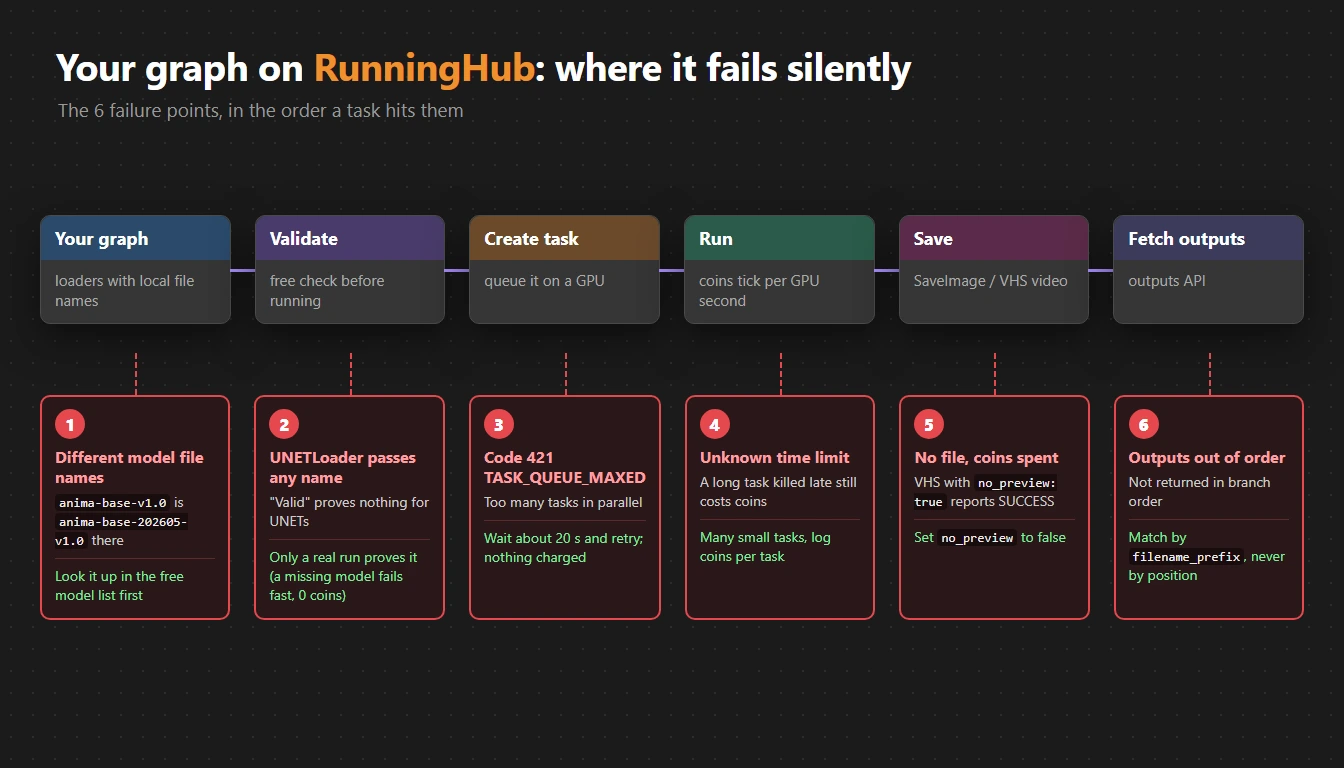
RunningHub accepts any ComfyUI graph through its API, as long as it only uses nodes and models it has. That is powerful, and also full of quiet failures. These are the ones that got me.
1. The same model has a different file name
Anima base is anima-base-v1.0.safetensors on my PC. On RunningHub it is anima-base-202605-v1.0.safetensors. With the local name, the task fails with Model in folder 'unet' with filename ... not found.
Fix: look the name up first. RunningHub has a free public model list (no API key needed):
POST /openapi/v2/resource/list
{"resourceType": "UNET", "resourceName": "anima", "current": 1, "size": 50}
resourceType can be UNET, CHECKPOINT, GGUF or LORA.
2. The validation check lies for UNETLoader
Validating a graph without running it reports a bad name as value_not_in_list for checkpoints, CLIP, VAE and ControlNet loaders. For UNETLoader it accepts any name, so "valid" means nothing there. Only a real run proves a UNET exists.
Good news: a task that fails on a missing model fails within about 20 seconds and in my runs cost 0 coins.
3. Too many parallel tasks
At three tasks in parallel I once got code 421 TASK_QUEUE_MAXED on create. Nothing was charged. Wait about 20 seconds and retry instead of stopping the batch.
4. Keep tasks short
There is a limit on how long a task may run, but I have not found the actual number documented. A long task killed near the end still costs coins, so I send many small tasks (for example 25 images each) rather than one huge one, and log seconds and coins per task.
5. Video saves can succeed with no video
VHS_VideoCombine with no_preview: True makes RunningHub report SUCCESS, return no output files, and still charge the coins. Set no_preview to False.
6. Outputs come back in a different order
With several SaveImage branches in one task, the outputs API does not return them in branch order. Give every branch its own filename_prefix and match results by the prefix in the file URL, never by position.
Every finished task tells you its cost:
consumeCoinsandtaskCostTimein the outputs API. Print them for every run.
Comments
Loading…