 RefBoard
RunningHub LoRA not working? Put it in file_name, not lora_name
An uploaded LoRA in RHLoraLoader's lora_name field loads nothing and gives no error. It has to go in file_name. Plus: RunningHub replaces your seed, so same-seed tests are not same-seed.
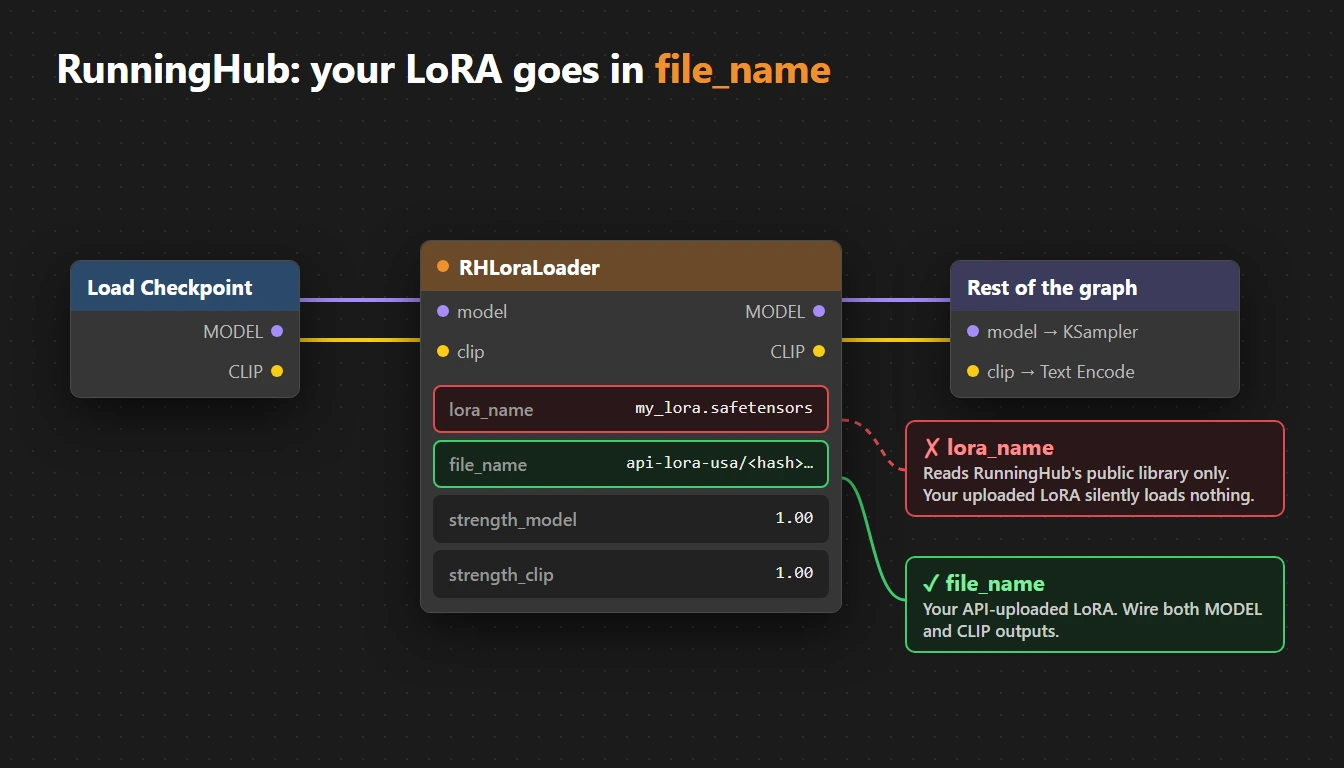
This one cost me close to a hundred renders before I noticed: my own LoRA was not being applied at all, and RunningHub never said a word.
The symptom
Renders with your uploaded LoRA look exactly like renders without it. No error, no warning, and the task still costs coins.
The cause
RHLoraLoader has two name fields, and they read from different places:
| Field | Reads from |
|---|---|
lora_name |
RunningHub's own public LoRA library, by file name |
file_name |
Files you uploaded through the API (paths like api-lora-usa/<hash>.safetensors) |
Put an uploaded LoRA's path in lora_name and RunningHub accepts it and loads nothing.
The fix
RHLoraLoader
  lora_name: ""                                   (empty)
  file_name: api-lora-usa/<your-hash>.safetensors
RHLoraLoader is a full loader with MODEL and CLIP outputs. Wire both: character trigger words live in the CLIP half, so wiring only MODEL weakens the LoRA.
Test it before a batch
Render one image whose prompt is only the trigger word, with no description. If the LoRA works, its character or style shows up anyway. If you get a generic picture, the LoRA is not loaded. This one check would have saved my whole batch.
Bonus gotcha: your seed is not your seed
RunningHub replaces the seed (KSampler) and noise_seed (KSamplerAdvanced) values on every run. I sent 777 and got 1491, 7215, 2311 and so on.
- "Same seed" A/B comparisons on RunningHub are not same-seed.
- To know the seed that was actually used, read it from the
promptmetadata inside the output PNG.
Comments
Loading…